Cruise packing is a little different from packing for a normal hotel stay.
You are preparing for a floating resort, a compact cabin, changing time zones, patchy mobile service, sunny decks, salty air, and busy port days where you may only have a few hours to explore.
The right tech can make the trip easier, safer, and more memorable, but the wrong tech can become dead weight in your suitcase.
The smartest approach is not to pack every gadget you own. It is to think through the rhythm of a cruise. You need devices that help before embarkation, inside the cabin, around the ship, and during shore excursions.
Anything that adds stress, needs constant charging, creates security worries, or breaks cruise-line rules should probably stay home.
Like when Doug had his drone taken away at the gangway on a Holland America Line cruise ship!
So this is a practical guide to the cruise tech that is actually worth packing on your next sailing, along with the items that deserve a second thought before they take up precious luggage space.
Start With the Phone, but Prepare It Properly
Your smartphone will probably be the most important piece of tech you bring. It handles boarding documents, cruise-line apps, excursion confirmations, photos, maps, messaging, alarms, translation, mobile payments, and emergency contacts.
On many ships, the cruise app is also used to check daily schedules, book shows, review menus, track onboard spending, and message other guests.
Before leaving home, update your phone and cruise app so you are not trying to download a large update over slow airport or ship Wi-Fi. Save digital copies of passports, travel insurance, booking confirmations, airline details, hotel addresses, and excursion vouchers. Keep these files available offline, not only in email or cloud storage.
It is also worth downloading offline maps for each port. Google Maps and Apple Maps can both be useful when you are wandering through an old town, looking for a beach shuttle, or trying to get back to the pier without using mobile data. If your itinerary includes countries where you do not speak the language, download an offline translation pack too.
A phone lanyard or crossbody strap can be surprisingly useful on port days. It keeps your phone easy to reach for photos and navigation while reducing the chance of dropping it from a tender boat, scenic overlook, or crowded street.
A Portable Charger Is Essential for Long Port Days
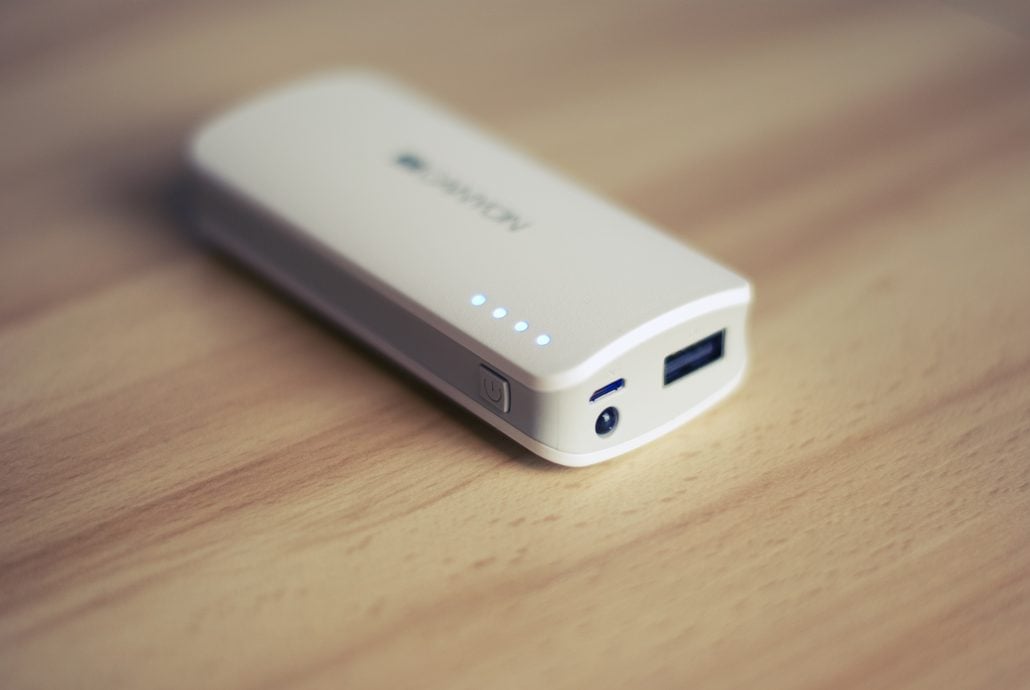
A compact power bank is one of the best pieces of cruise tech you can pack. Shore excursions often start early and run for hours. Between maps, photos, videos, translation, rideshare apps, and messages, your phone battery can drain faster than expected. This is especially true in hot weather, where phones can lose power more quickly or dim the screen outdoors.
Choose a power bank that is small enough to carry comfortably but strong enough to recharge your phone at least once. For most travelers, a 10,000 mAh model is a good balance between capacity and portability. If you are traveling as a couple or family, bring more than one instead of relying on a single large battery that everyone has to share.
Remember to pack charging cables in your day bag, not only in your suitcase. A power bank is useless if the cable is back in the cabin. Short, durable cables are easier to manage when you are charging from a backpack or small purse.
Pack Charging Gear That Fits Cruise Cabins

Cruise cabins usually have fewer outlets than hotel rooms, especially on older ships. At the same time, most travelers now bring phones, watches, earbuds, cameras, tablets, e-readers, and sometimes medical devices. Charging quickly becomes a nightly puzzle.
A multi-port USB charger is often more practical than several separate wall plugs. Look for one with USB-C and USB-A ports so it can handle newer and older devices. A small charging station can also keep cables from spreading across the desk or nightstand.
The important detail is to check your cruise line’s rules before packing outlet extenders, extension cords, power strips, or surge protectors.
Royal Caribbean, for example, lists extension cords and multi-plug outlets or power strips among its prohibited onboard items.
Other lines may have similar rules or slightly different policies. If you use a CPAP machine or another medical device, contact the cruise line before sailing so you can request approved support instead of guessing.
For international itineraries, bring the correct plug adapter for your embarkation hotel and ports. Many cruise cabins have a mix of outlet types, but you should not assume your room will match every device you bring.
A simple adapter is usually enough for modern chargers, but check voltage requirements on anything unusual, such as hair tools or specialty electronics. An international adapter lives in my suitcase.
Capture Photos and Videos Without Carrying Too Much

Cruises are made for photos: sailaway views, dinners, sunrise decks, colorful streets, beaches, markets, waterfalls, ruins, and family moments that happen quickly. The challenge is choosing camera gear that you will actually use.
For many travelers, a modern smartphone is enough. It is light, always available, and excellent for wide shots, food photos, short videos, and quick portraits.
If you love photography, a compact mirrorless camera or travel zoom can still be worth packing, especially for Alaska, wildlife excursions, architecture, or low-light scenes. Just be realistic about whether you want to carry extra lenses and protect them from moisture.
Action cameras are useful for snorkeling, kayaking, ziplining, beach days, and bike tours. If you bring one, pack the right mounts, a floating grip, a waterproof case if needed, spare batteries, and a small microfiber cloth. Salt spray and sunscreen can ruin footage fast if the lens is smudged.
Smart glasses are becoming more interesting for cruises because they let travelers capture hands-free photos and short videos while walking, cycling, or exploring a port.
A lightweight pair of meta glasses can be useful when you want to record a street performer, a food market, a coastal path, or the moment your group steps into a historic square without constantly holding up a phone.
They are best used thoughtfully, especially in museums, religious sites, private shops, and crowded areas where people may not expect to be recorded.
If you bring any camera device, think about backup. Uploading everything to the cloud may not be realistic on ship Wi-Fi. A small phone-compatible flash drive, extra memory card, or laptop-free backup device can give peace of mind if your trip is long or photo-heavy.
Pay attention to the cruise line rules regarding recording.
Noise Control Makes the Ship More Comfortable

Cruise ships are lively. That is part of the appeal, but it also means noise follows you into many spaces. There may be music by the pool, hallway sounds near cabins, theater crowds, children running past, or early morning announcements. Noise-canceling earbuds or headphones can make the trip more comfortable.
Earbuds are best for travel days, walking around the ship, and sleeping on flights. Over-ear headphones are better for long flights and deep noise reduction, but they take up more space. If you are sensitive to noise, pack what you already know works for you.
Download music, podcasts, audiobooks, and shows before the trip. Streaming can be unreliable or expensive at sea, and downloaded entertainment is useful during flights, tender waits, laundry time, or quiet afternoons in the cabin.
An E-Reader Beats a Stack of Books
Cruises are one of the few trips where people still imagine themselves reading for hours, and sometimes they actually do. Sea days, shaded loungers, balcony mornings, and quiet lounges are perfect for reading. An e-reader is a strong choice because it is light, holds several books, and usually has excellent battery life.
If you prefer paper books, bring one and enjoy it. But for longer cruises or itineraries with several sea days, an e-reader saves space and weight. Load it before the trip, including a few easy reads for tired evenings. Waterproof or water-resistant models are especially useful near pools and beaches.
A Smartwatch Can Help, but It Is Not Mandatory
A smartwatch can be useful on a cruise, but it depends on how you travel. It is handy for alarms, step tracking, timers, quick notifications, contactless payments in some ports, and keeping your phone tucked away during excursions. Fitness-focused travelers may like tracking walks around the promenade deck, hikes, snorkeling sessions, or bike tours.
The downside is that it adds another device to charge. If you already wear one daily, bring it. If you do not, a cruise is probably not the time to buy one unless you have a specific reason. A simple waterproof watch can sometimes be better, especially for beach days when you do not want to worry about battery life or notifications.
Waterproof Protection Is Cheap Insurance
Water is everywhere on a cruise. Even if you never swim, you will deal with rain, pool splashes, tender boats, beach bags, and humid ports. A waterproof phone pouch is inexpensive and useful for beach excursions, kayaking, paddleboarding, waterfalls, and sudden tropical rain.
Test the pouch at home with tissue paper before trusting it with your phone. Make sure the seal works and that you can still use the touchscreen or camera well enough for your needs. For serious water activities, a waterproof action camera is safer than relying on a phone pouch alone.
A few resealable bags are also worth packing for cables, earbuds, medication, passports, or wet swimwear. They are not glamorous tech accessories, but they protect the tech you already paid for.
Consider Connectivity Before You Sail
Internet at sea has improved, but it is still not the same as being on land. Depending on the ship, route, weather, and package, speeds can vary. Before buying a Wi-Fi plan, think about what you actually need. Messaging and email require much less data than video calls or streaming. If you only need to check in occasionally, you may be able to rely on port Wi-Fi and offline preparation.
Check your mobile carrier’s international roaming options before departure. Some travelers prefer a daily roaming pass, while others use an eSIM for port days. The best choice depends on your itinerary. A Caribbean cruise with several countries is different from a Mediterranean cruise where you may want reliable maps and messaging every day.
Put your phone in airplane mode once the ship leaves port unless you understand maritime roaming charges. Connecting through a ship’s cellular network can be expensive. Use Wi-Fi calling or messaging apps if your plan and ship package support them.
Small Tech Extras That Earn Their Space

A few small items can make cruise life easier. A magnetic hook can hold charging cables, hats, lanyards, or small bags because many cabin walls are metal. A compact Bluetooth tracker inside your luggage or day bag can help if bags are delayed or misplaced. A tiny cable organizer keeps chargers from becoming a knot in your backpack.
A travel-sized nightlight can help in interior cabins, which can be extremely dark. Some travelers use a motion-sensor light in the bathroom area to avoid turning on bright lights at night. If you bring one, choose a battery-powered option rather than something that needs an outlet all night.
A tablet can be useful for families, remote workers, or travelers who like watching downloaded shows. For everyone else, it may be unnecessary. If you are packing light, your phone and e-reader may cover most needs.
What to Leave at Home
The easiest way to pack better tech is to remove items that add more hassle than value. Leave drones at home unless you have checked both cruise-line rules and local laws for every port. Many ships restrict them, and many ports have strict rules around airports, crowds, historic sites, and protected areas.
Avoid bringing large speakers. Most cruise passengers do not want someone else’s playlist at the pool, on the balcony, or at the beach. Earbuds are more considerate and easier to pack.
Skip bulky camera kits unless photography is a central purpose of the trip. If you are constantly worried about theft, weather, or changing lenses, you may enjoy the day less. Also avoid unapproved electrical accessories, especially anything that could be confiscated at embarkation.
The Best Cruise Tech Is Practical, Not Flashy
The best cruise tech solves real travel problems. It keeps your phone alive during excursions, helps you navigate unfamiliar ports, protects devices from water, makes your cabin easier to manage, and captures memories without taking you out of the moment.
A good packing list might include a smartphone, compact power bank, multi-port USB charger, offline maps, waterproof pouch, noise-canceling earbuds, e-reader, and one camera option that suits your travel style. Add a smartwatch, tablet, smart glasses, or action camera only if they fit the way you actually plan to spend your days.
Cruises are full of transitions: ship to shore, pool to dinner, airplane mode to port data, planned excursions to spontaneous wandering. Pack tech that makes those transitions smoother. If a device earns its place in your bag before, during, and after the trip, it is probably worth bringing. If it only sounds impressive on a packing list, it can stay safely at home.
A Little Preparation Goes a Long Way

Once your cruise begins, the last thing you want to worry about is a dead battery, an unexpected roaming charge, or a device that doesn’t work when you need it. Taking a few minutes before departure to test your equipment, organize your chargers, and understand your cruise line’s policies can prevent unnecessary headaches once you’re onboard.
Remember that technology should complement your vacation, not compete with it. Some of the best moments at sea happen when you put the phone away, enjoy the view, and take in the experience without looking at a screen. After all, you booked a cruise to see the world, not spend your vacation managing electronics.